Design-rule check (DRC)
opens a per-layer table of limits: min width, min spacing, min notch (all three in µm), min area (µm²), grid (nm), and resist height (µm). Leave a cell blank to skip that check. What each check measures, and how layer pairs and density windows work, is explained under How these work. One-click writer presets set the min-width floor on every layer at once — laser (1.5 µm), e-beam (200 nm), BEAM (500 nm), or soft litho / PDMS (20 µm, the low-cost soft-lithography foundry floor for microfluidic masters).
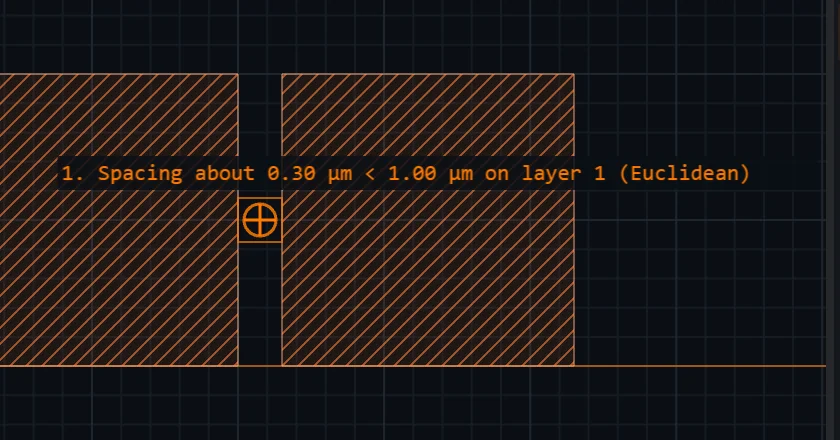 View full image
Rules describe your process, not the drawing you happen to have open, so opening a document that doesn't use one of your layers never deletes that rule: it's shown read-only in a "Kept" group at the bottom of the dialog, named by its layer, and carried through untouched the next time you run the check. Open a document with that layer to edit or check it again, or click Forget in that group if you genuinely want it gone — that button is the only way a rule is deleted for this reason, and like every other edit in this dialog it takes effect only when you Run, not the moment you click it.
Rules can be scoped to one datatype. Each row in the table is one rule — by default one per layer number — and under the layer's name is a scope picker listing what your document actually carries for that number: 1 — all datatypes (the default), then 1/0, 1/4, and so on — one entry per (layer, datatype) row in the Layers panel. Leave it on "all datatypes" and the rule behaves exactly as it always has: every datatype of that layer number is merged into one region and checked together, which is what every rule you already have means. Pick a specific pair and only that row's shapes are gathered — findings then name the pair (Width ~100 nm < 500 nm on layer 1/4) and the report groups them under Layer 1/4 instead of Layer 1.
For example, on a mask where 1/0 is drawn metal and 1/4 is dummy fill you can hold the fill to a looser min width without loosening the real metal: scope layer 1's rule to 1/4 and set the fill's floor there.
And you can keep both rules at once. Under the scope picker, the first row of each layer number carries a + datatype rule button: click it and a second rule row appears for the same layer number, scoped to the next datatype your document carries. So 1/0 can hold a 500 nm floor while 1/4 holds a 2 µm one, both live, both reported separately (Layer 1/0: … and Layer 1/4: …). Each extra row has its own Remove; the first row of a layer number has none, because clearing its fields is how a rule is deleted. A scope another row of that number already holds is not offered twice, so two rows can never fight over one rule. (Until this release a layer number could hold only one rule, and scoping it to 1/4 silently stopped checking 1/0.)
Layer-pair rules have always had both sides independently scopeable, so enclosure(1/0 inside 1/4) was — and stays — a rule you can write. A scope naming a datatype your document doesn't have (a rule deck carried over from another design) is shown as 1/7 — not in this document and kept, never silently widened back.
One caveat about waivers. A waiver is keyed by the rule kind and the finding's location, not by the datatype — so if the same geometry is flagged once by a 1/4-scoped rule and once by an unscoped one, waiving either waives both. They are the same geometry failing the same kind of rule, so the waiver can only ever silence a finding you have already looked at.
Resist height is a soft-lithography (SU-8 mold) aspect-ratio guard: GDS geometry has no height axis, so if you tell the check how tall your resist layer is, it derives a minimum-width floor of height ÷ 5 (a conservative 5:1 max aspect ratio — SU-8 can be pushed further under careful process control, but 5:1 is a safe design default) and checks it exactly like min width. Set only a resist height to check aspect ratio alone; set both a min width and a resist height and the stricter of the two wins — the check never lets a taller resist loosen an explicit min-width floor you already set. Like min width, it also widens and checks paths.
Min spacing splits into notch and isolated findings. Every spacing violation is a gap that's narrower than allowed — but a gap can arise two ways: a self-touching concavity carved into a single polygon (a notch, e.g. a comb tooth or a slot), or a real gap between two separate polygons (isolated spacing). Each finding says which it is, and the report counts them separately. By default min spacing governs both, unchanged from before this distinction existed — set min notch as well to judge notches against their own, different threshold instead. Each class is checked, and can fail, independently of the other's threshold no matter which of the two numbers is larger: a genuine min-spacing violation is never hidden by a looser or stricter min notch, and vice versa. Leave min notch blank (or set it equal to min spacing) and nothing changes. Setting min notch to a value that actually differs from min spacing runs the spacing check twice — once per threshold — roughly doubling that layer's check time; this is useful when a process tolerates a tighter self-touching notch than it does true inter-feature spacing (or the reverse), but costs accordingly.
Min spacing can be measured two ways, and you pick which per layer. Any layer with a min spacing gets a Min space metric selector under its row:
- Euclidean (the default for any min spacing you set from now on) measures the true straight-line distance between facing edges, so it also catches gaps that lie diagonally — most importantly corner-to-corner. Two 1 µm squares whose nearest corners sit 500 nm apart on a 3-4-5 diagonal have a real 500 nm gap, and Euclidean reports it at 500 nm.
- Projection — KLayout's own default — compares two edges only where they face each other along a common axis: slide one edge along its own direction and the gap is measured only over the stretch where the two overlap. It is what most layout tools do by default, and it is blind to that corner-to-corner gap, which it reports as nothing at all because the two corners project onto no shared axis.
A layer is measured with one metric or the other, never both, so no gap is counted twice. Min notch always uses the projection metric, whichever you pick — and because a Euclidean min spacing already covers notches (it is KLayout's space check: isolated gaps and notches together), a layer that sets both a Euclidean min spacing and a min notch can report one narrow notch twice, once against each threshold. Each finding names the metric that measured it, in the marker label and in the report ("Layer 1 (Euclidean): 2"), and the row says so before you run. Nothing is greyed out: both settings are legitimate together, they just answer two different questions.
Why Euclidean is the default for new rules — and why your existing rules did not change. Until this release a new min spacing started on Projection, for KLayout parity. What decided against that was watching someone use it: reading the dialog cold, with a file that has a real 500 nm diagonal corner gap in it, the default returned "no design-rule violations found" — and nothing anywhere on screen said a whole class of gap had not been looked at. A clean result you cannot trust is worse than a slower one. Euclidean never misses what Projection finds (it is a superset), it is the cheaper metric on a large layer, and it runs on layers where Projection refuses outright.
So, precisely:
- A min spacing you type into a row that has no metric yet is stored as Euclidean, written out explicitly.
- A rule that was already saved keeps the metric it already had. A deck saved before this change has no metric recorded at all, which still means Projection — opening the dialog and pressing Run check does not rewrite it, and a design that passed yesterday still passes today.
- KLayout parity is one click: pick Projection in the same selector. The two options say which is which ("Euclidean (default for new rules)" / "Projection (KLayout's default)"), and your choice is remembered per layer with the rest of your rules.
- Min width and min notch are unaffected — they are always measured with the projection-style morphological check, whatever this selector says.
Verified against KLayout, and what it costs. The Euclidean metric was compared with KLayout 0.30.11's own space check (Euclidean metric, 90° angle limit) on the committed parity fixtures: 0 mismatches across a 26-threshold × 4-fixture sweep (104 cells) and 0 across the 20 pre-registered threshold cells, matching not only the violation counts but the reported distances (500 nm on the corner-gap fixture, 290 / 300 / 310 nm on the spacing fixture, 424.26 nm on the 45° one). It is also the cheaper metric on a large layer: it needs no morphological band, so a 20 × 20 mm die of 100 000 rectangles checks in about 2.2 seconds, where the projection metric refuses that size outright. Its own ceiling refuses before computing (1 500 000 flattened vertices; 400 000 with the legacy boolean engine), and a refused check is stated in the report and the toast — it never reads as a clean design.
Waivers are per finding, not per metric. A waiver is keyed by the rule and the finding's own location, and the two metrics produce structurally different witnesses for the same gap, so waivers made under one metric will generally not carry over to the other: switch a layer to Euclidean and expect to re-waive what it finds. Nothing is lost — your existing waivers stay exactly as they are, and they apply again if you switch the layer back.
Layer-pair rules check two DIFFERENT layers against each other, below the per-layer table. Add one with + Add rule, pick which check, and the two layers it applies to:
- Enclosure (A encloses B) — every part of layer B must sit at least the given distance inside layer A (e.g. a via required to land inside its metal pad). Geometry drawn at exactly that distance passes.
- Min pair spacing (A to B) — layer A and layer B must clear each other by at least the given distance wherever they don't already overlap; an overlap is not a spacing violation.
- No overlap (A and B) — layer A and layer B must share no area at all (KLayout's
overlapcheck). A shared edge or corner with no actual overlapping area is not flagged — only a genuine, measurable overlap is. - Must intersect (every A touches B) — every separate shape (connected region) on layer A must touch layer B somewhere, e.g. every via must land on some metal. A via with no metal anywhere underneath is flagged as an orphan.
No overlap and Must intersect have no distance to set — the Value column doesn't apply to them and is disabled. All four flatten SRef/ARef first, like every other rule here, and check boundaries/boxes only (not paths). Like the per-layer rules, pair rules are remembered in your browser, not written into the .gds.
Density (window) is a third rule group, below the pair rules: a moving-window fill-density check — the CMP / etch-loading rule a fill pattern exists to satisfy, and the one number a whole-design average (Verify → Layer statistics, Arrange) cannot answer. Add one with + Add density rule and give it a layer, a window and a stride (both µm), and a min % and/or max %; a fresh row starts on the usual convention — a 500 µm window stepped on a 250 µm stride, held between 20 % and 80 %.
- What it measures. For each window, the merged area of that one layer inside the window, divided by the window's own area. Merged, so overlapping shapes are never double-counted. The layer picker names an exact layer/datatype pair, so
1/0and1/4are separate rules. SRefs/ARefs are flattened first, like every other rule here. - Window and stride. The window is a square of the given size; the stride is how far it moves between measurements, so a stride smaller than the window makes consecutive windows overlap — which is what you want, because a violation straddling two window boundaries would otherwise hide between them. A stride wider than the window would leave strips of the design inside no window at all, so it is refused outright rather than run: the row says so before you run it, along with the other refusals (no min or max set — a min of 0 % or a max of 100 % can never fire; min % above max %, which no window could ever satisfy). A max of 0 % is not vacuous and is allowed: it is the "this layer must be empty here" keep-out rule.
- Empty windows count as 0 %, they are not skipped. A bare patch is a min-density rule's single most important finding. Windows at the edge of the design are clipped to it and measured against their clipped area, never extrapolated; the grid is anchored on the flattened design's own extent.
- Only violating windows become markers — a clean map of a large die would be thousands of markers nobody needs. Each marker's label states the measured percentage against the limit, and steps with
F2/Shift+F2like every other finding. The report adds one line per rule: how many windows were measured and how many fell outside the band. - Ceilings, and what they say. Two, both refusing before anything is computed rather than grinding: 400 000 flattened vertices on the rule's layer with the default boolean engine (120 000 when the legacy
polygon-clippingengine is switched on in Settings — measured, the legacy engine runs out of memory past it) ("… exceeds the 400,000 limit for a density check — check a sub-cell, or split the layer") and 40 000 windows ("This window/stride asks for N windows, over the 40,000 limit — widen the stride, or measure a smaller region"). Above 300 000 vertices or 20 000 windows you get a warning instead, and the run proceeds. A rule that could not be measured is stated in the report and in the toast — an unmeasured check never reads as a clean design. - Verified against KLayout. Glyph's map was compared window-by-window with KLayout 0.30.11's own density map over a generated 20 × 20 mm die of 100 000 rectangles: 0 of 6 241 windows differ by more than ±0.5 % absolute (largest difference 5 × 10⁻⁹, which is the comparison file's own rounding), and 0 of 49 on a smaller die.
- On/off toggle. Each row has an On checkbox; unchecking it disables the rule without losing its numbers — unlike deleting the row, the window/stride/bounds stay exactly as typed for next time, and the row's own status line says "Not checked: this rule is disabled."
- Like every other rule here, density rules are remembered in your browser, not written into the
.gds.
Importing a KLayout rule deck. Import KLayout deck… (top right of the dialog) reads a KLayout DRC script — a .lydrc macro or a plain .drc Ruby file — and shows, before anything is saved, which of its lines become Glyph rules and which do not. The deck is read, never run. What maps: layers bound with input(layer, datatype) (a bare input(1) means 1/0, as it does in KLayout), and on them .width(v), .space(v) (Euclidean, or Projection when the line says projection), .notch(v), a.enclosing(b, v) / b.enclosed(a, v) (a layer-pair Enclosure rule) and .with_area(nil, v) or .with_area(0, v) (a min area), with .output("name") naming the rule in the preview. Values read the way KLayout reads them: 0.5.um, 500.nm, 0.0005.mm, a bare decimal is µm, a bare whole number is database units (a whole-number area is database units²), and 2.um2 is an area. A name bound to a plain value (w = 0.5.um) can be used as a limit; it keeps the value it had when it was bound, as in Ruby. Integers are read as Ruby reads them (010 is 8). The importer imports a rule only when every statement of the deck is a form it knows; when it cannot be sure what Ruby would do, it refuses. It cannot see an error KLayout raises only while running the deck (for example a known check given an option it does not accept), so run such a deck in KLayout before relying on the import. A deck that redefines a name the importer reads (def input(…), define_method(:width), alias, reopening a Ruby core class) is refused whole, because the rule would not mean what it says; a def of a new helper refuses only its own lines. Every statement must be a form Glyph knows — a KLayout DRC call or plain Ruby it recognises, using names bound earlier in the deck. If any statement is not (a typo such as m1.notch(0.4.um).;output(…), a stray keyword, an unknown method, two statements on one line), KLayout itself might reject the deck, so the whole deck is refused: the preview says "Glyph cannot tell whether KLayout would run this deck: line N is not a form Glyph knows" and Apply imports nothing. Every other statement is listed as Refused with its lines and the reason — a boolean (a & b), .sized or any other derived layer, anything inside an if, a loop or a block (including a statement on an else, when or rescue line), a layer given by name (input("METAL1")), a check Glyph has no rule for (.isolated, .separation, …), and a second rule of the same kind on the same layer (Glyph keeps one; the refusal names the line it kept). A refused statement that changes a name (m1 += …, m1.size(…), w *= 2) makes every later rule that uses the name refused too. Text Ruby does not run — comments, strings, heredocs, =begin/=end blocks and anything after __END__ — is never read as a rule, and a comment line inside a chain of .method lines does not split it. An unclosed bracket or string refuses the whole deck, naming the start of its statement. Every line of code in a deck is listed in the preview, as a rule, a refusal or a line that is not a rule; a file the importer cannot read at all is refused whole rather than stopping Glyph. A line that starts with . after a blank line refuses the whole deck too. A binary file (such as a .gds picked by mistake) or a file over 1 MB is refused without being read. Check a refused line by hand in KLayout — it is not imported and not checked. source, report and run settings (deep, tiles, …) are listed as lines that are not rules. Apply first saves the table as it stands, then adds the deck's rules: a limit the deck states replaces that one limit (the preview says "replaces …", also when only the spacing metric changes), and no other rule is removed. A rule you keep for every datatype of a layer (the table's plain layer row, and every technology preset) is not replaced by an imported input(1, 0) rule — both run, and the preview names the one that also runs. A rule from input(1, 0) is scoped to datatype 0. Two differences from KLayout remain, both stated in the preview where they apply: min notch is measured with the projection metric, and Glyph's width, projection-spacing, notch and enclosure checks treat a shortfall of 1 nm or less as at the limit, so a 499 nm line under a 500 nm rule passes in Glyph and fails in KLayout. On two test dies checked by KLayout 0.30.11 and by Glyph with the same imported decks — 21 decks, 18 of them written to trip the importer — every imported rule flagged the same sites with the same distances, apart from those 1 nm cases.
Press F7 (or ) to run. Then:
- With no rules set yet, the toast says so and offers Open Design rules, which opens the dialog above.
- Every SRef / ARef in the active cell is expanded first, so a spacing error between two instances of the same cell is caught — it only exists in the parent, and checking the un-expanded cell would report clean.
- The check runs in a background worker with a Cancel button, and is strictly read-only: it never touches your drawing or the undo stack.
- Violations appear as numbered markers on the canvas, and the view immediately jumps to the first one — the summary toast says so — "5 violations — showing 1 of 5; press F2 for the next." (under the KLayout key preset, where
F2is zoom-fit, it names Verify → Next violation instead). From there, pressF2/Shift+F2to step to the next / previous violation; the view zooms to each one with enough surrounding geometry to see what went wrong. removes them. - A finding's measured value and its limit are printed with enough decimals to tell them apart: a 498 nm ring under a 500 nm rule reads
0.498 µm < 0.500 µmin µm (fewer decimals would show0.50 < 0.50). - When violations cluster tightly, overlapping labels are automatically hidden so the rest stay legible — the marker you've stepped to with
F2always keeps its label, even in a dense cluster. - Grid flags every boundary, box, and path vertex that isn't a multiple of the entered grid (nm) — the classic "on-grid" manufacturing check. Because instances are expanded first, a rotated or magnified instance is caught even when its cell is itself on-grid, and a grid-only rule set skips the heavy geometry merging entirely, so it stays fast on any layer.
- Min width on right-angled geometry — a T or comb junction, a closed frame, a frame with an island inside it — reports the width KLayout 0.30.11's own
width_checkreports on the same shapes (checked on combs with straight, staggered and checkerboard teeth, and on plain, notched and island-holding frames). A short neck cut into a frame's outside, and a small frame whose four corner blocks leave only short necks, report KLayout's width too. Known miss, where KLayout flags a thin neck and Glyph reports nothing: a small frame drawn at 45° (a diamond) whose corners leave only short diagonal necks.
Rules are remembered in your browser and apply to whatever document you open — they describe the process you intend to fabricate with, not the drawing. They are not written into the .gds.
What is checked: boundaries and boxes; width/spacing also widen and check paths (stroked to their outline, honouring width, joints and end caps); and, by the grid rule alone, every path vertex too. Layer-pair rules — enclosure, pair spacing, no-overlap, and must-intersect (see above) — check boundaries and boxes across two layers. A density rule counts the same area any other check would see — boundaries, boxes, and a widened path's own outline — but not a zero-width centreline, which has no area to count. What is not: a zero-width (centreline) path under width/spacing — it has no width to widen, and Glyph tells you when a checked layer contained one rather than implying a clean result — and any path under the area rule or a layer-pair rule (a path's area is width × length, which is ambiguous, so both stay boundaries/boxes only). Electrical connectivity (does a net actually route through, as opposed to merely touching) is not checked — see Connect ports (Instances: SREF and AREF) for the port-graph feature that comes closest. Very dense layers are slow — the check is exact, not sampled.