Cells and hierarchy
Cells are how GDS organises geometry. One cell is the top cell (the root of what gets saved); other cells are reusable stamps.
 View full image
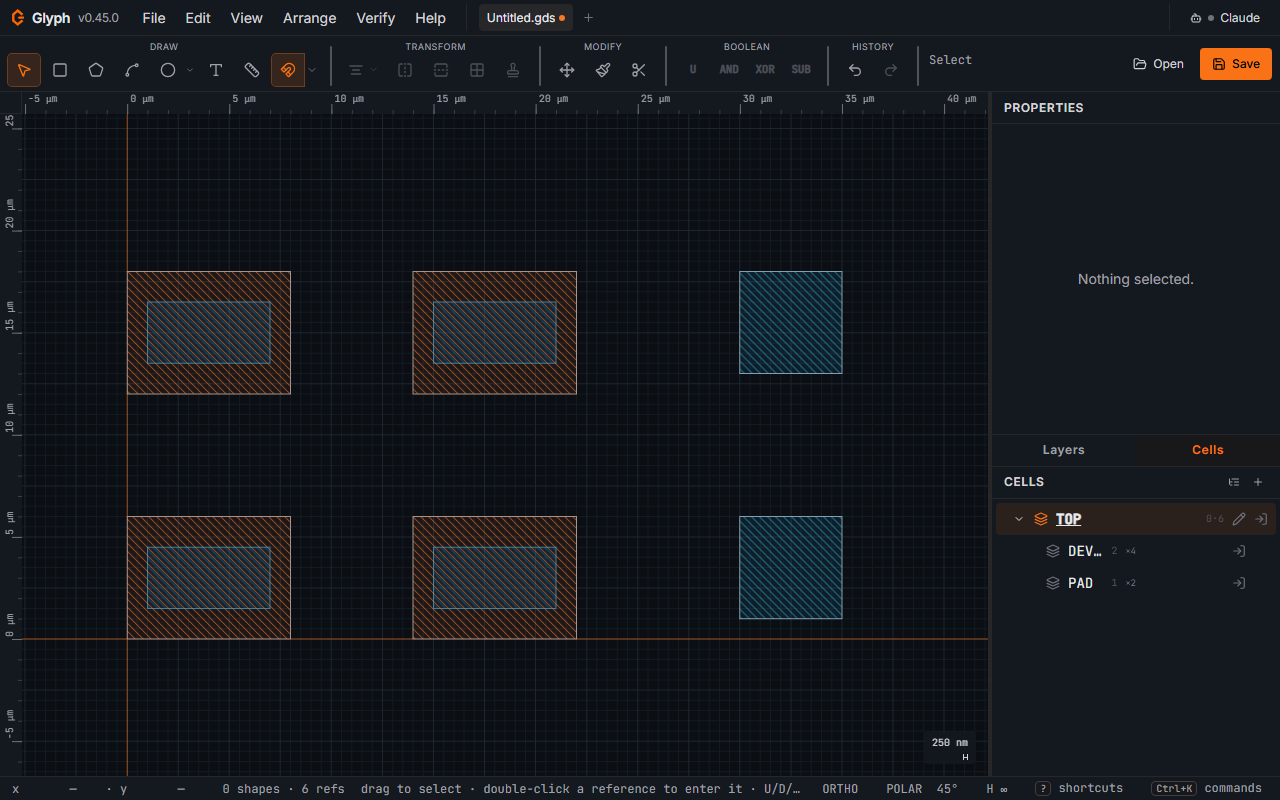
The Cells panel lists every cell with its shape / SRef / ARef counts. Each row's tooltip also shows the cell's content extent and how many flattened instances of it exist across the whole design (AREFs counted as rows × cols); a cell instanced many times shows a small ×N badge — click it to open Find shapes & instances… pre-seeded with ref:<cell> over the whole document (in quotes when the name has a space, ref:"Block 1"), so you can jump straight to every placement. In flat view a header button cycles the sort between name, instance count, and area — handy for finding "which cell is placed 50 000 times" or the largest cells. The tree view opens with the top cell's direct children already visible (one level deep) rather than fully collapsed to a single row, so a hierarchy design doesn't look empty on first open. Breadcrumb at the top of the canvas shows the edit context.
| Action | How |
|---|---|
| Add cell | + button at the top of the panel |
| Enter a cell (start editing its contents) | Double-click the cell row, or double-click an SRef/ARef in the canvas with the Select tool armed (a shape under the cursor, e.g. text, is edited instead of entering). Re-fits the view to that cell when its geometry would otherwise be off-screen — a child's coordinates are its own, so without this a cell placed far from the parent origin opened onto a blank canvas. The view is left alone when the cell is already in view, when it is empty, when you return to the top cell, and when you switch tabs (each tab keeps its own view). |
| Exit a cell (back to parent) | Click a breadcrumb crumb above the canvas |
| Rename | Click the pencil icon on the cell row, type, Enter |
| Duplicate cell | Right-click the cell row → "Duplicate cell". Copies its shapes/SRefs/AREFs under a new name (lowest free <name>_N suffix). Shallow duplicate: any SRef/AREF inside the copy still points at the same child cells as the original — matches KLayout's default cell copy, not its ancestry-isolating "Make Cell Variants". |
| Delete | × button on the cell row (the top cell cannot be deleted) |
| Hide / show cell instances | Eye icon on the cell row. While hidden, every SRef/AREF that targets that cell is omitted from the canvas (the cell itself, its shapes, and the row stay — only the instances are muted). Useful for "mute the dummy fill" without changing layers. The hidden flag is per-document, undoable, and is not written to the .gds. |
| Group selection into a new cell | Right-click selection → Group. Selection is replaced by an SRef to the new cell. |
| Flatten hierarchy | Arrange → Flatten hierarchy: inlines every SRef/AREF in the active cell. |
| Prune unreferenced cells | Arrange → Prune unreferenced cells…: deletes every cell unreachable from any top cell (orphaned subtrees and reference cycles left behind by edits) in one undoable step. A second, independently-valid top-level structure — one with no incoming refs of its own — is never touched. |
Each cell row also shows a small shapes·refs count next to the cell name so you can scan the hierarchy at a glance.
Cell-model guarantees (what Glyph does differently than the raw GDS spec)
- Rename is safe. Renaming a cell also rewrites every SREF / AREF that pointed to it, and updates
topCellif needed. No dangling refs. - Cyclic references are refused at insert time. You cannot place cell A inside cell A, and you cannot place B inside A if A is already (directly or transitively) inside B.
- Deleting a cell cascades. All SRef/ARef instances of the deleted cell are also removed from every containing cell in the same command. A single
Undorestores the cell and every ref that pointed to it. The cascade only removes references to the deleted cell — cells it referenced are not recursively deleted, so a subcell used only by the one you just deleted becomes an orphan top-level cell — a valid top cell in its own right, so Prune unreferenced cells leaves it alone (it is unreferenced, not unreachable); delete it explicitly if you do not want it.
These guarantees mirror KLayout's cell model (refs-by-name, cycle-guarded inserts, cascade-delete) so files written by Glyph load cleanly in other tools.