Lay out a thermo-optic phase shifter (waveguide + heater)
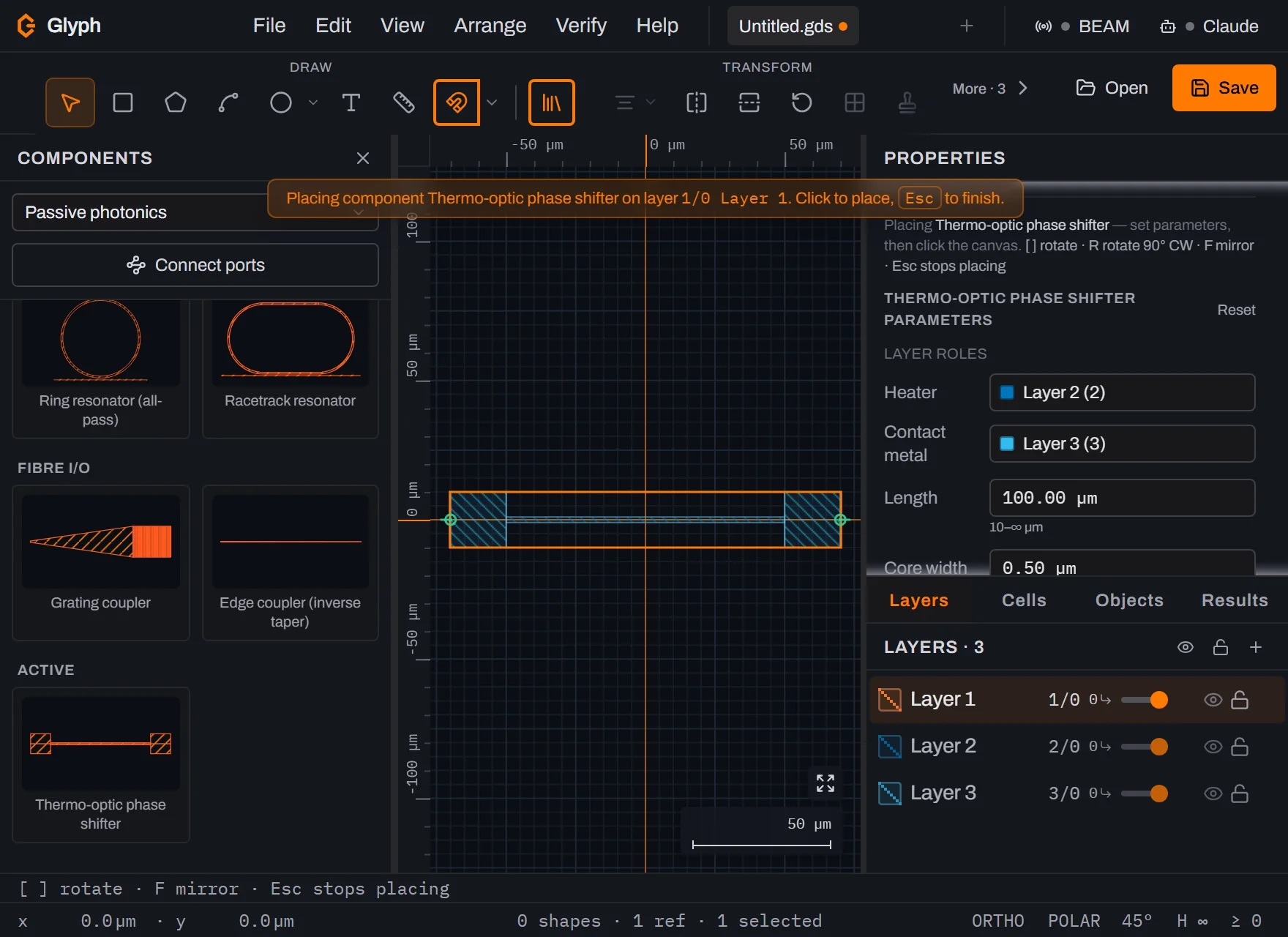
A thermo-optic phase shifter needs three things on three different layers: a waveguide core, a resistive heater strip above it, and two contact pads. Glyph's built-in ph.phaseShifter component generates all three at once and lets you map each onto a real GDS layer before it lands.
- Time: ~10 min
- You'll need: Glyph open with a document that has (or can add) separate layers for the waveguide core, the heater, and the contact metal.
 View full image
- Open the Components panel and set its library dropdown to Passive photonics.
- Click the "Thermo-optic phase shifter" card in the Active category. This arms it for placement — a ghost follows your cursor on the canvas.
- Set the parameters in the Properties panel:
Length(default 100 µm),Core width(default 0.5 µm),Heater width(default 2 µm), andContact padsize (default 20 µm). Each field enforces a sane minimum so the geometry stays manufacturable. - Map the layer roles. Below the parameters, two role pickers appear — Heater and Contact metal — because this component declares extra layer slots beyond its primary layer. Pick the GDS layer each should draw on; if you leave a role unmapped, that geometry still draws, just stacked on the primary layer, so nothing silently disappears.
- Rotate or mirror before you drop it, if needed:
[/]rotate the ghost,Rsnaps 90° clockwise,Fmirrors it. - Click the canvas to place it. The component drops as one cell instance (an SREF), centred on your click point, with the waveguide on the primary layer and the heater and pads on the layers you mapped.
- Reselect it to tweak parameters later. Selecting the placed instance shows the same parameter fields and role pickers (now read-only) in the Properties panel — editing a value regenerates the geometry as one undo step.
- Route the waveguide ports to neighbouring components. The phase shifter exposes
in/outoptical ports at each end, so it snaps into a larger circuit the same way any other photonics component does.
What you built
A single placed instance carrying three-layer geometry — waveguide core, heater strip, and two contact pads — generated from one parametric definition, with each layer role mapped explicitly rather than guessed from draw order.
Next steps
Once you're placing more than one component, understanding how Glyph structures instances matters: see Cells & hierarchy for how SREF/AREF placements relate to their source cells. For the physical process this layout eventually drives, read NANYTE's maskless lithography overview. Or open the editor and place a phase shifter yourself.